
What is isoboard?
isoboard is a menu bar app for macOS that turns a screenshot into content you can edit. When you paste, you get real text you can select, change and search, tables with rows and cells, and images as separate pictures. You do not get a picture of your screen. isoboard keeps the text styling, tables and images of what you captured. It reads each capture with isOCR™, a local model that runs on your Mac, or with an AI provider you connect using your own API key.
isoboard runs on macOS 14 Sonoma or later. Windows and Linux are coming, prioritized by demand. Vote for your platform on GitHub.
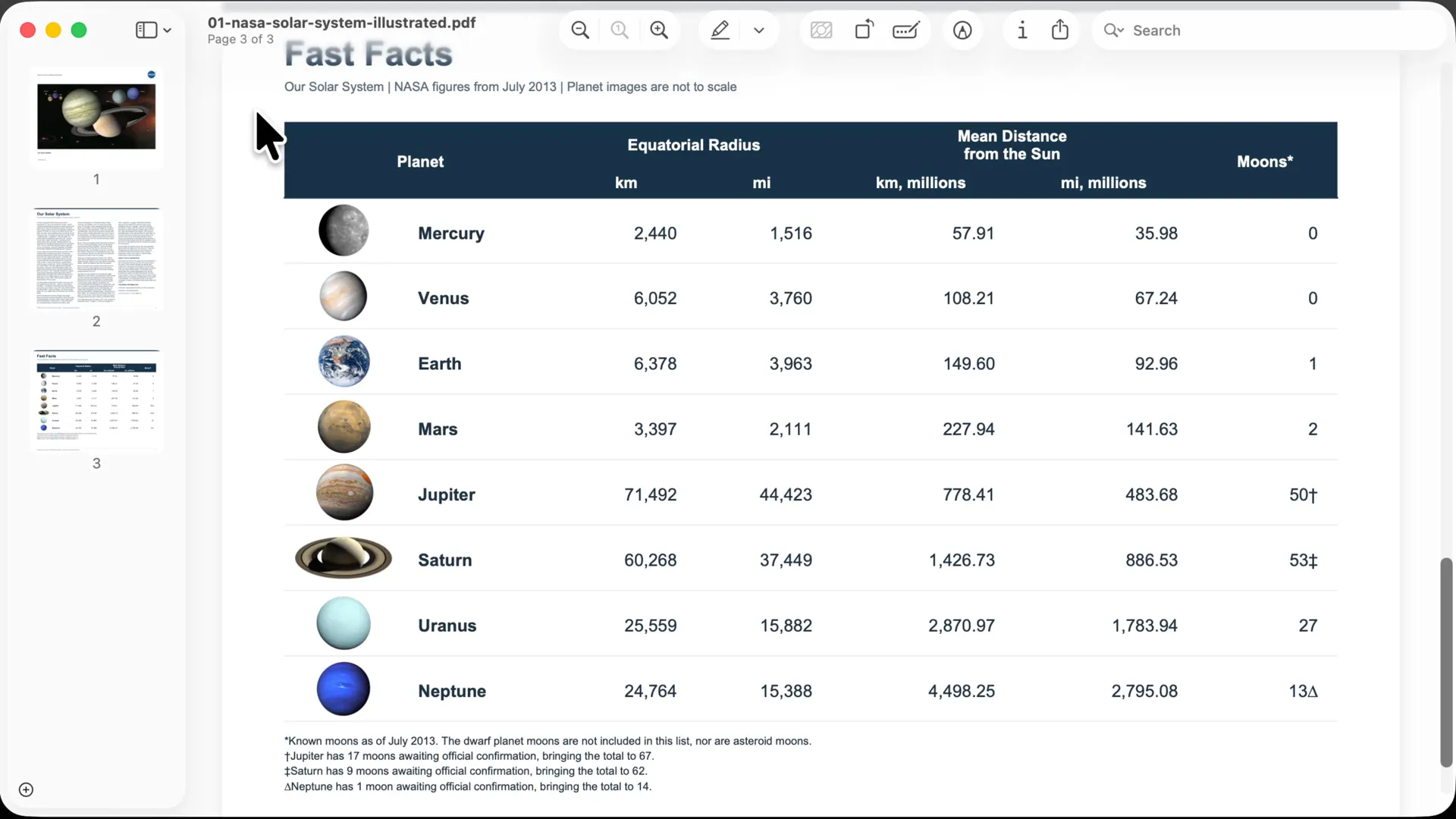
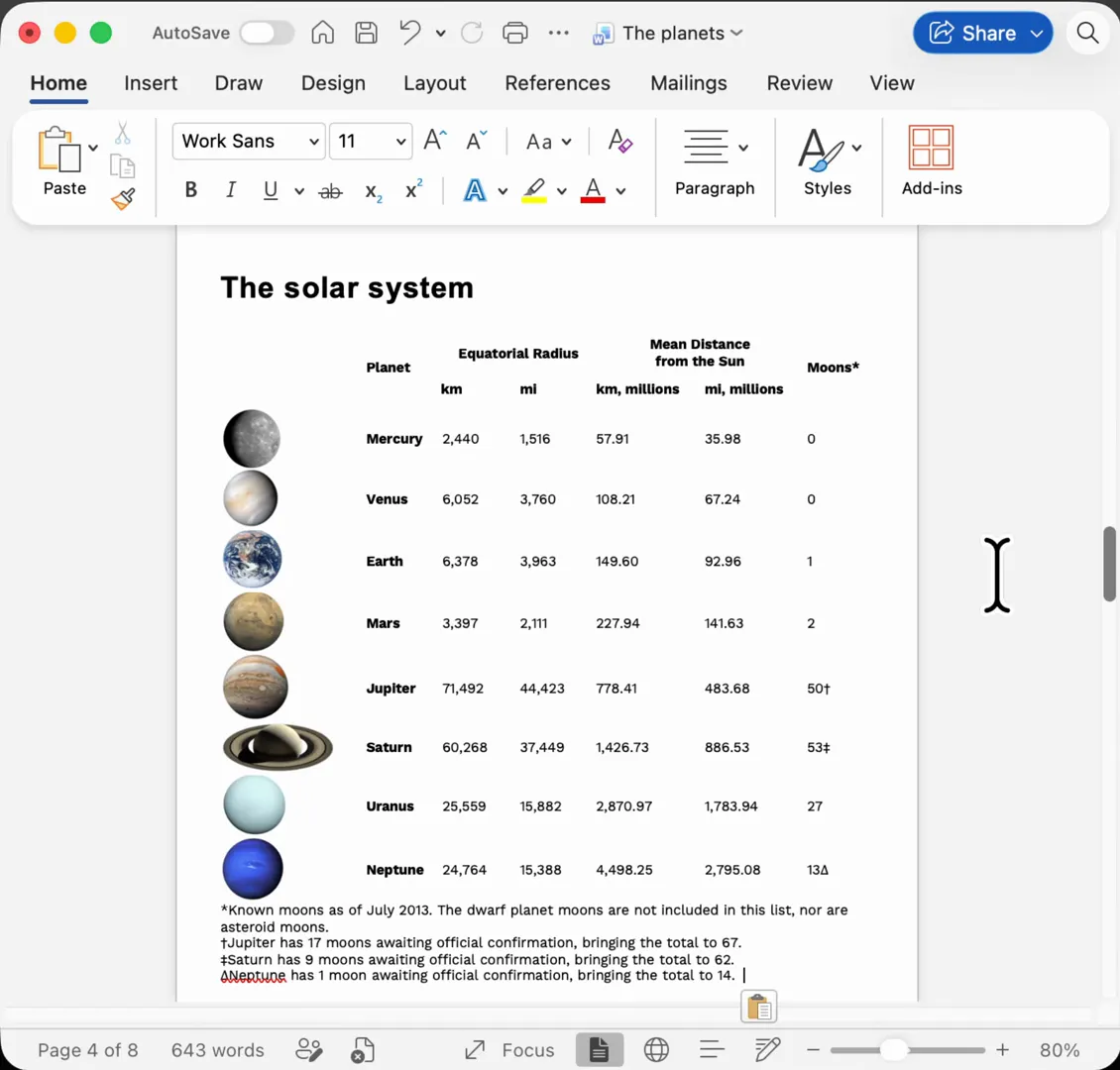
What can isoboard do?
Section titled “What can isoboard do?”- Capture a region of your screen with a global shortcut and get the result on your clipboard. See capture part of your screen.
- Paste content you can edit. Text, tables, styling, colors and images in the capture come back as real content, so you can fix a typo, sort a table or restyle a heading. Each of these can be switched off per Profile.
- Transform content before you paste. Additional Rules reshape, filter, clean up or translate the content with instructions you write.
- Go back to earlier results. History restores a result to the clipboard without running the model again.
Who is isoboard for?
Section titled “Who is isoboard for?”isoboard is for anyone who regularly needs content from places that do not let them copy it: a table in a PDF, a recipe on a web page, a slide, a chart in a video call, an app that blocks text selection. The result pastes into the editors, documents and spreadsheets you already use. See paste results into other apps.
You can use it for free for personal, non-commercial use. Commercial use needs a license after a seven-day evaluation. See pricing and licensing.
How does isoboard work?
Section titled “How does isoboard work?”- You press a shortcut and drag over part of your screen.
- A model reads the image. With a local model, this happens on your Mac. With an AI provider, isoboard sends the image to that provider.
- isoboard turns the model’s output into formatted content, adds a plain-text version and puts both on your clipboard.
- You paste. Apps that support formatting get the text, tables and images. Plain-text fields get the text only.
A small overlay shows progress and tells you when the result is on the clipboard.
How is isoboard different from macOS Live Text?
Section titled “How is isoboard different from macOS Live Text?”Live Text is built into macOS. It recognizes text in images and screenshots, and you can copy that text. isoboard covers a different job: it keeps the structure of what you capture and can change it before you paste.
| macOS Live Text | isoboard | |
|---|---|---|
| What you copy | Plain text | Rich text, tables and images |
| Tables | Copied as text | Pasted as a table |
| Text styling and colors | Plain text has none | Kept where the destination app supports them |
| Images inside the capture | Plain text has none | Cropped and embedded in the result |
| Transform content | No | Yes, with Additional Rules (for example translation) |
| Needs an AI model | Built into macOS | isOCR on your Mac, or your own AI provider |
| Cost | Included with macOS | Free for personal use, license for commercial use |
Live Text is a good fit for copying a line or a paragraph. Use isoboard when the layout matters, or when you want to translate or restructure what you capture. The two do not conflict, and you can use both.
Does isoboard send my screenshots to the cloud?
Section titled “Does isoboard send my screenshots to the cloud?”Only if you choose a cloud model. With isOCR, the image stays on your Mac and conversion works offline after a one-time download. With an AI provider, isoboard sends the image to that provider under your own account. See what leaves your Mac.
Frequently asked questions
Section titled “Frequently asked questions”Is isoboard free?
Personal, non-commercial use is free. Work use needs a commercial license, with a seven-day evaluation first. AI provider charges are separate and go to the provider. See pricing and licensing.
Does isoboard work offline?
Yes, with isOCR once the model is downloaded. The download is about 1 GB and needs an internet connection once. AI providers need a connection to their service.
Which operating systems does isoboard support?
macOS 14 Sonoma or later today. Windows and Linux are coming, prioritized by demand. Vote for your platform on GitHub.
Does isoboard replace macOS Live Text?
No. Live Text keeps working as before. isoboard adds table, formatting and image preservation, and transformations such as translation, for the captures where plain text is not enough.